How to Track Work-in-Progress (WIP) in a Manufacturing Factory
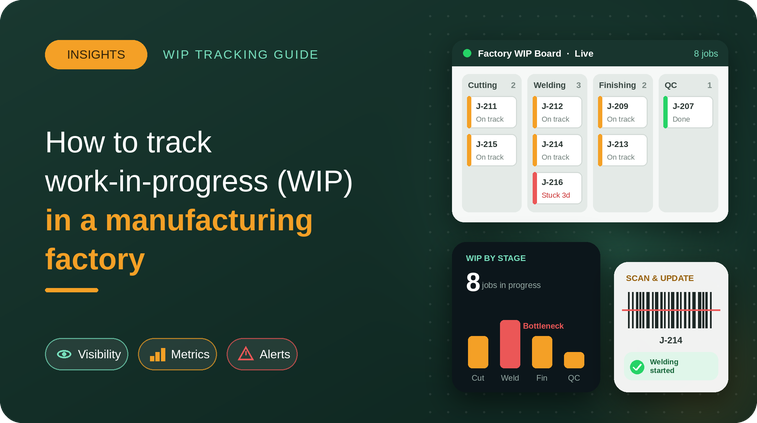
Work-in-progress (WIP) is one of the most important areas of manufacturing operations. It represents products that have entered the production process but are not yet completed.
For manufacturers, knowing exactly what is currently being produced, where it is in the production process, how much has been completed, and what is causing delays is essential for effective production management.
However, many factories still rely on Excel sheets, paper records, phone calls, and WhatsApp messages to track WIP. As production volume increases, these methods can make it difficult to maintain accurate and up-to-date information.
A digital production tracking system can give manufacturers better visibility into WIP and help production teams identify delays, bottlenecks, and unfinished jobs more quickly.
In this guide, we explain what WIP is, why WIP tracking matters, how to track WIP effectively, common challenges, and how manufacturing software can improve production visibility.
What Is Work-in-Progress (WIP) in Manufacturing?
Work-in-progress (WIP) refers to products, components, or jobs that are currently somewhere within the manufacturing process but have not yet reached the finished-goods stage.
For example, a manufacturing order may move through several stages:
Raw Material → Cutting → Machining → Assembly → Quality Check → Finished Goods
Until the product completes the entire process, it remains WIP.
WIP can include:
- Partially manufactured products
- Components waiting for the next operation
- Jobs currently being processed
- Products waiting for quality inspection
- Items waiting for rework
- Orders waiting for the next production stage
Understanding where WIP is located helps production managers understand the actual status of manufacturing operations.
Why Is WIP Tracking Important?
Effective WIP tracking provides manufacturers with better visibility into production.
Without accurate WIP information, managers may struggle to answer basic questions such as:
- How many jobs are currently in production?
- Which operation is each job currently at?
- How much quantity has been completed?
- Which orders are delayed?
- Where is WIP accumulating?
- Which jobs are waiting for materials?
- Which products are waiting for quality inspection?
- Which orders are ready for dispatch?
Accurate WIP tracking can help production teams identify these issues earlier.
Common Problems With Manual WIP Tracking
Many small and medium-sized manufacturing companies still manage WIP manually.
This can involve:
- Excel spreadsheets
- Paper registers
- Production boards
- Phone calls
- WhatsApp updates
- Manual reports
These methods may work for simple production environments, but they can become difficult to manage as the number of production orders, machines, operators, and processes increases.
Delayed Information
If production data is updated at the end of a shift, managers may not know the current status of a job during the day.
Data Entry Errors
Manual entries can contain incorrect quantities, missing updates, or duplicate information.
Limited Production Visibility
When information is spread across multiple files and communication channels, it becomes difficult to get one reliable view of production.
Difficult WIP Reconciliation
Production teams may spend considerable time comparing planned quantities, completed quantities, rejected quantities, and remaining quantities.
Delayed Decision-Making
When accurate production information is unavailable, managers may find it difficult to respond quickly to delays or bottlenecks.
How to Track WIP Effectively
A good WIP tracking process should provide visibility from the beginning of a production order until completion.
Step 1: Create the Production Order
Start by recording important information such as:
- Job or work order number
- Product
- Required quantity
- Customer
- Planned production date
- Delivery date
- Production stages
This creates a clear reference for tracking the job.
Step 2: Define Production Stages
Break the manufacturing process into clearly defined operations.
For example:
Cutting → Welding → Machining → Assembly → Quality → Packing
This makes it easier to understand where each job is in the production process.
Step 3: Record Production Quantities
At each stage, record:
- Planned quantity
- Produced quantity
- Accepted quantity
- Rejected quantity
- Remaining quantity
This provides a clearer picture of production progress.
Step 4: Track Movement Between Operations
WIP should be tracked as it moves from one operation to another.
For example:
1,000 units planned
→ 1,000 units sent to Cutting
→ 950 units completed
→ 950 units sent to Machining
→ 900 units completed
This helps identify where production losses or delays are occurring.
Step 5: Track Rework and Rejections
Not every product moves through production without issues.
Manufacturers should record:
- Rejected quantity
- Defect type
- Rework quantity
- Rework status
- Final accepted quantity
This prevents inaccurate WIP and production reports.
Step 6: Monitor Pending WIP
Production managers should be able to identify jobs that are:
- In production
- Waiting for material
- Waiting for a machine
- Waiting for quality inspection
- Waiting for rework
- Waiting for the next operation
This information can help teams prioritize delayed jobs.
WIP Tracking Example
Consider a factory producing 500 units of a component.
The production process includes:
Cutting → Machining → Assembly → Quality Inspection
The current status is:
| Production Stage | Quantity |
| Planned | 500 |
| Cutting Completed | 500 |
| Machining Completed | 470 |
| Assembly Completed | 440 |
| Quality Approved | 420 |
| Rework | 15 |
| Pending | 65 |
This simple view helps the production manager understand how much work has progressed through each stage and where additional attention may be required.
WIP Tracking and Production Bottlenecks
One of the biggest benefits of accurate WIP tracking is identifying bottlenecks.
A bottleneck occurs when one stage of production cannot keep up with the required flow of work.
For example:
Cutting → Machining → Assembly
If cutting produces 1,000 units but machining can process only 700 units, WIP may start accumulating before machining.
Without proper tracking, this buildup may not be immediately visible.
With stage-level WIP tracking, managers can identify where work is accumulating and investigate the underlying cause.
How WIP Tracking Helps Reduce Production Delays
WIP visibility can help production managers monitor pending work and identify potential delays.
For example, if a production order has been waiting at a particular operation for several hours or days, the team can investigate whether the issue is related to:
- Machine availability
- Material availability
- Operator availability
- Quality problems
- Maintenance
- Production scheduling
- Rework
Identifying these issues earlier can help teams respond before they significantly affect delivery schedules.
WIP vs Finished Goods: What’s the Difference?
WIP and finished goods represent different stages of the manufacturing process.
| WIP | Finished Goods |
| Still undergoing production | Production is complete |
| May require additional operations | Ready for sale or dispatch |
| Can be at different production stages | Usually ready for delivery |
| Requires production tracking | Requires inventory and dispatch tracking |
Keeping these categories separate helps manufacturers maintain accurate production and inventory information.
How Manufacturing Software Improves WIP Tracking
As manufacturing operations grow, tracking WIP manually can become increasingly difficult.
Manufacturing software can help centralize production information and provide visibility into:
- Work orders
- Production stages
- Planned quantities
- Completed quantities
- Rejected quantities
- Rework
- Pending quantities
- Machine status
- Production progress
- Quality status
- Dispatch readiness
Instead of collecting updates from multiple sources, production managers can access production information from a centralized system.
Benefits of Digital WIP Tracking
A digital WIP tracking system can help manufacturers:
Improve Production Visibility
Managers can get a clearer picture of what is currently happening on the shop floor.
Identify Bottlenecks
Accumulating WIP can indicate that a particular production stage requires attention.
Reduce Manual Reporting
Production information can be recorded and organized digitally instead of relying entirely on spreadsheets and paper records.
Improve Production Planning
Accurate WIP information can help production teams make better decisions about upcoming jobs and available capacity.
Improve Delivery Planning
Knowing the current status of production orders can help teams understand which orders are approaching completion and which require attention.
Reduce Information Gaps
Centralized production data can reduce dependence on scattered updates across different communication channels.
How to Track WIP Without Excel
Excel can be useful for basic production tracking, but managing large numbers of production orders and multiple manufacturing stages can become challenging.
Manufacturers moving beyond spreadsheets can consider digital production management software that provides:
- Centralized production tracking
- Work order management
- Production planning
- WIP tracking
- Quality tracking
- Shop-floor updates
- Production reports
- Real-time visibility
The right solution depends on the size and complexity of the manufacturing operation.
WIP Tracking for Small and Medium-Sized Manufacturers in India
Small and medium-sized manufacturers often need better production visibility as their order volume grows.
A factory may have multiple jobs running simultaneously, with different materials, machines, operators, and delivery dates.
In this environment, knowing the exact status of every production order becomes increasingly important.
Digital production tracking can help Indian manufacturers move from fragmented production updates toward a more structured and centralized approach.
Frequently Asked Questions About WIP Tracking
What Does WIP Mean in Manufacturing?
WIP stands for Work-in-Progress. It refers to products or jobs that have started the manufacturing process but are not yet completed.
Why Is WIP Tracking Important?
WIP tracking helps manufacturers understand the current status of production orders, identify bottlenecks, monitor pending work, and improve production visibility.
Can WIP Be Tracked Using Excel?
Yes, WIP can be tracked using Excel. However, as production complexity increases, maintaining accurate information across multiple orders and production stages can become difficult.
What Should Be Included in a WIP Report?
A WIP report may include:
- Work order number
- Product
- Planned quantity
- Completed quantity
- Pending quantity
- Production stage
- Rejected quantity
- Rework quantity
- Current status
- Planned completion date
How Can Manufacturing Software Help With WIP?
Manufacturing software can centralize production information and provide visibility into work orders, production stages, quantities, quality, rework, and pending production.
Improve WIP Visibility With TAKT Production
Effective WIP tracking is an important part of modern manufacturing management.
When production teams know exactly what is being produced, where each job is, how much has been completed, and where work is getting delayed, they can make faster and more informed production decisions.
TAKT Production helps manufacturers manage production activities through a centralized platform, providing visibility into work orders, production progress, WIP, quality, shop-floor activities, and production status.
Want Better Visibility Into Your Factory’s Production?
Book a Free TAKT Production Demo to explore how digital production tracking can help your manufacturing team manage WIP and improve production visibility.
More on this topic: our production tracking software guide.